Trackers
The Trackers view allows administrators to define and manage issue types. A tracker represents a category of issues (e.g., Bug, Feature, Task, Support, Epic) and determines which fields and workflows apply to issues of that type.
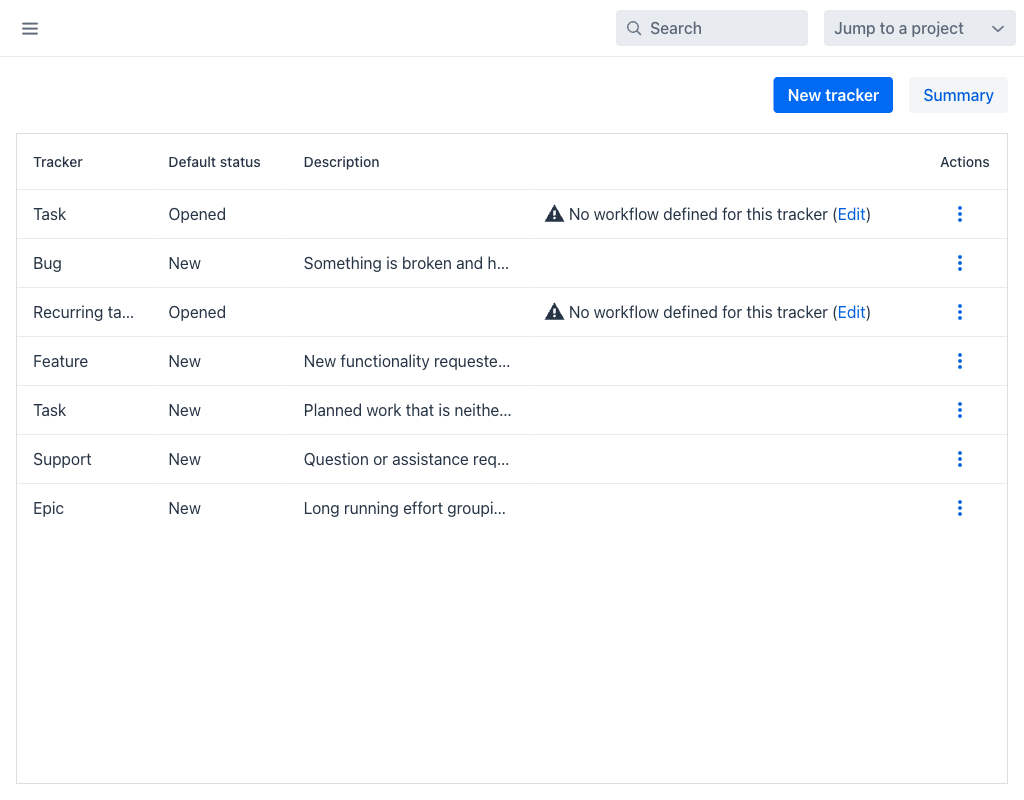
Trackers Grid
The grid displays the following columns:
- Tracker: The display name of the tracker.
- Default status: The status assigned to new issues created with this tracker.
- Description: An optional description of the tracker's purpose.
- Actions: A per-row actions menu (⋮) with Edit, Copy and Delete. Copy creates a new tracker preloaded with the settings of the selected one, which is the quickest way to derive a variant of an existing type.
The top of the view provides the following buttons:
- New tracker: Opens the tracker creation form.
- Summary: Displays a summary matrix of trackers and their associated settings.
A tracker with no workflow defined is flagged in the grid with the warning No workflow defined for this tracker, followed by an Edit link that opens the workflow editor for it. Issues of such a tracker fall back to the tracker's default status, since no transitions are configured.
Tracker Configuration
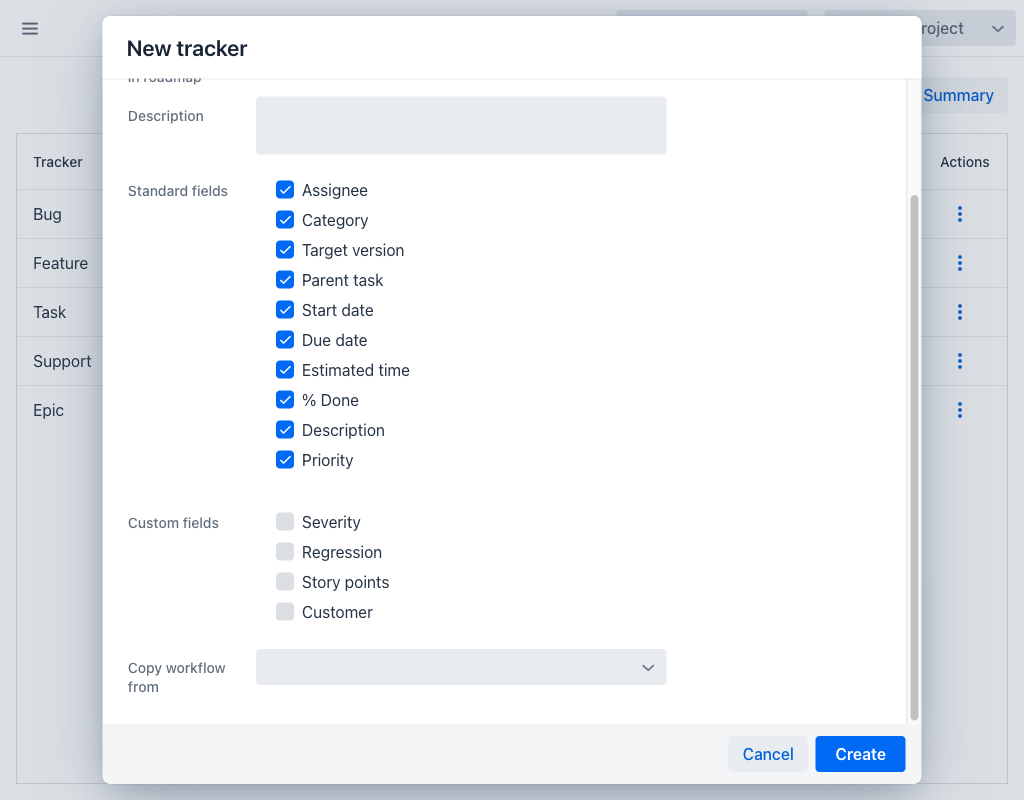
Each tracker defines:
- Name (required): The display name shown when creating or viewing issues.
- Default status (required): The initial status assigned to new issues of this tracker type.
- Issues displayed in roadmap: When enabled, issues of this tracker appear in the Roadmap under their target version. Trackers that track supporting work are usually excluded so that the roadmap stays focused on deliverables.
- Description: An optional description of the tracker's purpose.
- Standard fields: Which standard issue fields are enabled for this tracker. The available fields are Assignee, Category, Target version, Parent task, Start date, Due date, Estimated time, % Done, Description and Priority. Fields that are not enabled are hidden from the issue form.
- Custom fields: Which of the custom fields defined for issues apply to this tracker. Only the selected fields appear on the issue form for issues of this type.
- Copy workflow from: An existing tracker whose workflow is copied onto the new one. This is offered only while creating a tracker, and it saves defining every transition again for a type that behaves like one already configured. Leaving it empty creates the tracker with no workflow, which the grid then flags.
- Projects: Which projects use this tracker. Issues can only be created with a tracker if that tracker is enabled for the project.
Trackers are a key component of the Workflows configuration. Each workflow rule is defined for a specific combination of tracker and role, controlling which status transitions are allowed.
Deleting a Tracker
A tracker that still has issues cannot be deleted; the application reports This tracker contains issues and cannot be deleted. Move or delete those issues first, or keep the tracker and remove it from the projects that no longer need it.