Architecture
This section describes how AppJars are structured internally and how they attach to an existing application.
Layers
Each AppJar is a full-stack module divided into three layers that mirror the typical layers of a Java enterprise application. This layered structure means an AppJar can be adopted at any granularity: an application that already has its own UI can consume only the business and data layers, while an application that wants a complete out-of-the-box experience integrates all three.
Data Access Layer — covers all logic for querying, retrieving, and persisting data to a relational database. Implemented using Jakarta Persistence (JPA) with Hibernate. Each AppJar manages its own set of tables with a dedicated table prefix to avoid naming conflicts when multiple AppJars are present in the same schema.
Business Logic Layer — contains the service interfaces and their implementations. Services apply validation rules, orchestrate data access calls, and expose a clean API to the presentation layer and to application code. The business layer has no dependency on Vaadin or any presentation framework.
Presentation Layer — contains the Vaadin views, dialogs, components, and route configuration that provide the user interface for the AppJar's features. Views are registered dynamically at startup through each AppJar's RouteConfigurer bean, which allows the host application to assign a parent layout and override URL paths without modifying any AppJar source.
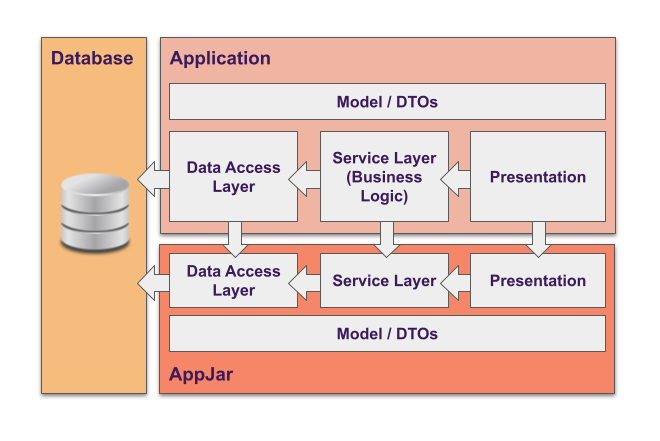
The layers communicate through a model module that defines the DTOs, enums, and value objects shared across the stack. Application code interacts with AppJar services using these model types, which means application and AppJar code share a common vocabulary without coupling to internal implementation details.
Module Structure
Inside each AppJar the code is divided into six Maven modules:
| Module type | Artifact suffix | Purpose |
|---|---|---|
| Model | -model |
DTOs, enums, auto-configuration entry point |
| Business API | -business |
Service interfaces; depend on this for clean-architecture compliance |
| Business Impl | -business-impl |
Service implementations; depends on JPA and domain logic |
| Data API | -data |
DAO interfaces |
| Data Impl | -data-impl |
JPA entities, DAO implementations, entity-to-DTO converters |
| Flow UI | -flow |
Vaadin views, RouteConfigurer, UI components |
A monolithic application integrates the three implementation modules (-business-impl, -data-impl, -flow). The contract modules (-business, -data) are pulled in as transitive dependencies. An application that follows strict layer isolation and only needs programmatic access to an AppJar's services can depend solely on -business and -model, without any UI or JPA implementation on the classpath.
Spring Auto-Configuration
Every AppJar registers itself through Spring Boot's standard auto-configuration mechanism. The entry point class is declared in:
META-INF/spring/org.springframework.boot.autoconfigure.AutoConfiguration.imports
This class triggers component scanning and JPA entity scanning for the AppJar's package. No @EntityScan or @ComponentScan declarations are required in the host application beyond what is described in each AppJar's Getting Started guide. All AppJar beans, repositories, and entities are discovered automatically.
Database Isolation
Each AppJar uses a dedicated table prefix to namespace its tables within a shared schema:
| AppJar | Table prefix |
|---|---|
| Activity Log | al_ |
| AI Support | as_ |
| Configuration Manager | cm_ |
| Data Query | dq_ |
| Dynamic Menu | dm_ |
| Email Manager | em_ |
| I18N Manager | AJ_I18N_ |
| Issue Tracker | (unprefixed, Redmine-compatible names) |
| Process Manager | pm_ |
| User Manager | um_ |
| User Profile | up_ |
This allows all AppJars to coexist in a single database schema without table name collisions.
Usage in Multi-Module Applications
Enterprise applications are frequently structured as multi-module Maven projects, with the business logic, persistence layer, and presentation layer compiled and deployed as separate artifacts. The fine-grained module structure of each AppJar is designed to support this pattern cleanly.
In a typical multi-module enterprise project, each application module has its own set of dependencies and its own set of responsibilities:
- A core or service module contains shared business logic. It can depend on the AppJar's
-businessmodule (service interfaces and DTOs only) without pulling in JPA entities, Hibernate, or Vaadin. This keeps the core module free of presentation and persistence concerns. - A persistence or data module depends on the AppJar's
-data-impland-business-implmodules, which carry the JPA entities and DAO implementations needed to talk to the database. - A web or UI module depends on the AppJar's
-flowmodule (Vaadin views and route configuration) alongside the business and data implementations.
Because the contract modules (-business, -data) declare only interfaces and DTOs, any application module that calls an AppJar service can do so without any transitive dependency on Vaadin, Hibernate, or the AppJar's internal implementation classes. This respects strict layer boundaries and avoids classpath pollution between modules.
The same principle applies to optional integrations between AppJars. The interfaces that bridge one AppJar to another (such as AuthenticatedUserProvider in AI Support or AISupportExternalDataService in the utilities library) are defined in contract modules. A module that provides an implementation of such an interface only needs the contract module on its classpath; it does not need to depend on the full AppJar implementation.