Issue Statuses
The Issue Statuses view allows administrators to define the set of statuses that issues can have throughout their lifecycle. Each status represents a stage in the issue workflow (e.g., Opened, In progress, In review, Closed).
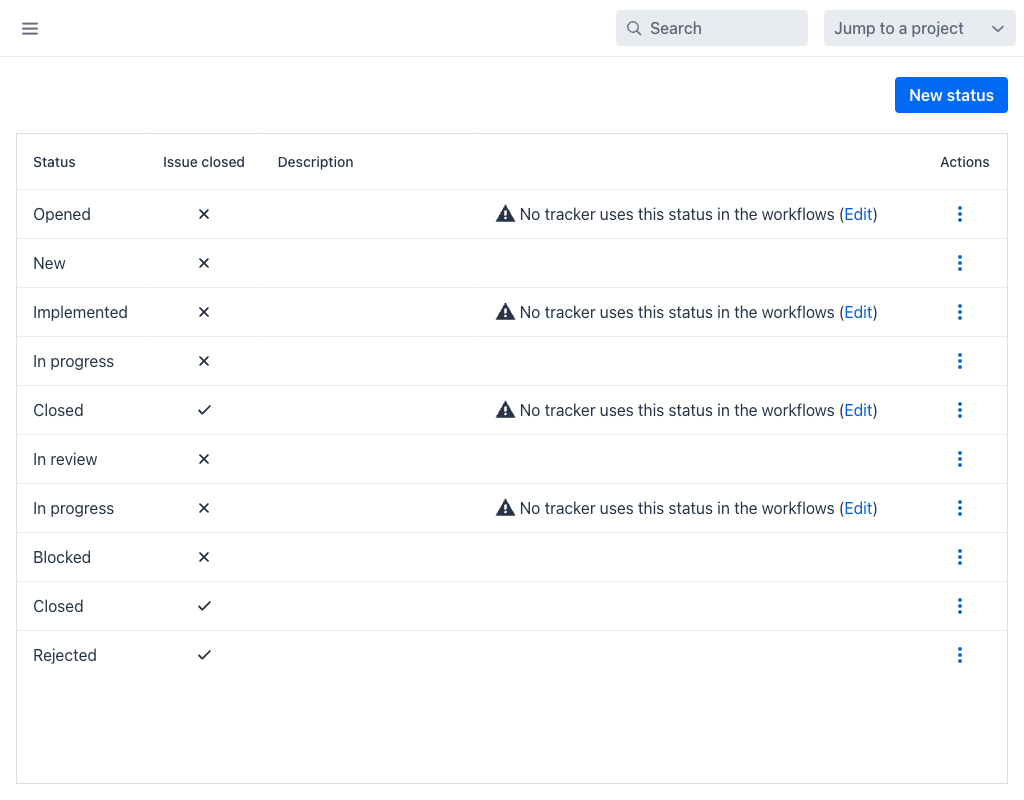
Statuses Grid
The grid displays the following columns:
- Status: The display name of the status.
- Issue closed: Indicates whether this status represents a resolved or completed state. Issues in a closed status are excluded from default open-issue filters.
- Description: An optional description of what the status means.
- Actions: A per-row actions menu (⋮) with Edit and Delete.
The New status button at the top-right opens the creation dialog.
A status that no tracker references in any workflow is flagged in the grid with the warning No tracker uses this status in the workflows, followed by an Edit link that opens the workflow editor. This makes it easy to spot statuses that have been defined but never wired into a process.
Creating a Status
When creating or editing a status, the following fields are available:
- Name (required): The display name of the status.
- Description: An optional description.
- Issue closed: A checkbox indicating whether this status represents a closed or resolved state.
Status Usage
Statuses are used in two key areas:
- Issue display and filtering: The status of an issue determines whether it appears in open or closed issue lists. Users can filter issues by status in any issues grid.
- Workflows: Status transitions are controlled by Workflows. A workflow defines which statuses an issue can move to from its current status, based on the user's role and the issue's tracker type.
Deleting a Status
Deletion is guarded. A status cannot be deleted while it is still in use, and the application explains why:
- This status cannot be deleted because is used by some issues — reassign the affected issues to another status first.
- This status cannot be deleted because is used as default status by some trackers — change the default status on those Trackers first.
When a status is deleted, the workflow transitions that reference it are removed along with it.